| Home » Categories » Multiple Categories |
Order Entry - Replicate Detail Within an Order |
|
Article Number: 2374 | Rating: Unrated | Last Updated: Thu, Oct 24, 2024 at 10:54 AM
|
|
When adding or updating an order you may have a situation where the order line you wish to add is very similar to an existing line on the order. You may, as an example, need to add a line on a sales order that requires the same product and associated detail but needs to be allocated a different delivery date or site reference. This new feature allows you to highlight an order line and replicate it.
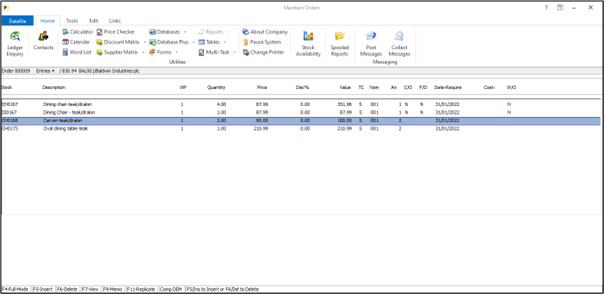
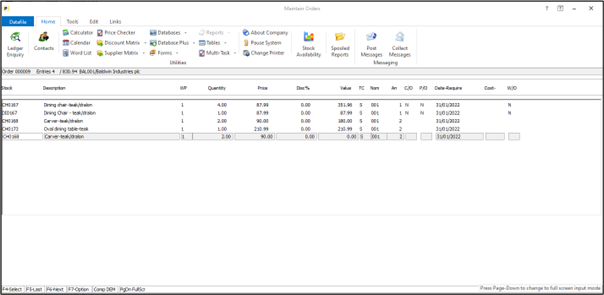
When using the ‘Detail Pick List’ configuration for order entry you can scroll up/down the list of order lines and use the <F5> or <Ins> key to insert new line, <F6> or <Del> key to delete a line or press <Enter> to amend the order line. This new feature allows you to press the <F11> key to choose the line to be replicated and then move the highlighted entry to where you wish to copy the line to and press <F11> again to copy.
InstallationThere are no specific installation options required to enable this feature but there are two pre-requisites for this feature to be used. Firstly, the system must be configured to be in ‘Detail Pick’ entry mode and secondly the option to ‘Prevent Duplicate Stock Codes Within Order’ must be disabled.
|
Attachments

There are no attachments for this article.
|
Related Articles 
Analyse Purchase Orders
Viewed 1883 times since Tue, Jul 3, 2012
Order Entry - Replicate Sales Orders with Deposits (SOP Only)
Viewed 531 times since Thu, Oct 24, 2024
Order Utilities
Viewed 1938 times since Tue, Jul 3, 2012
Order Entry – Set Detail Pick Mode Input Sequence for Extra Items
Viewed 361 times since Thu, Oct 24, 2024
Selective Detail Screens on Detail Pick-Mode Order Entry
Viewed 3109 times since Mon, Jun 11, 2012
Remove Redundant Orders - Application User Facilities
Viewed 2303 times since Wed, Jul 4, 2012
Default Ledger & Stock Update Descriptions
Viewed 2074 times since Wed, Jun 13, 2012
System Status
Viewed 1915 times since Tue, Jul 3, 2012
Sales/Purchase Order Header File – Item Screen Design
Viewed 1638 times since Wed, Jul 4, 2012
Job Costing Link at Order Header
Viewed 2500 times since Tue, Jul 3, 2012
|
| Datafile Home | KB Home | Advanced Search |
|
 |
|
|
|
|
|
|
 Print Article
 Email Article to Friend