| Home » Categories » Solutions by Business Process » Order Processing and Invoicer |
Extra Document Confirm Items |
|
Article Number: 2139 | Rating: Unrated | Last Updated: Mon, Jun 12, 2023 at 2:34 PM
|
|
Extra Document Confirm Items
Document processing currently allows for the setting of two confirm items when confirming the action quantity for an order line. This new feature allows for an additional ten items to be confirmed. 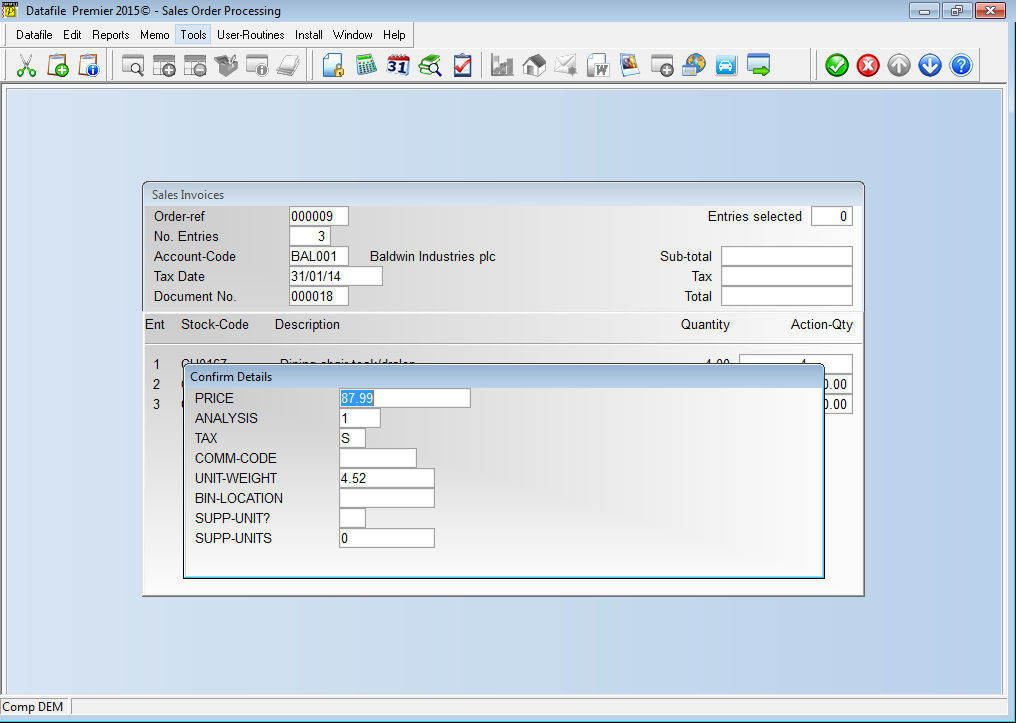 Installation
Document Design Manager To configure the document sign on as the SYSTEM user, or any user with Installer access rights, and right click on the required documents menu option and select Configure Option. Alternatively select Installation from the main menu, followed by Application Manager and then Document Design Manager before selecting Sales/Purchase Order Documents and the required document category. The system will list the available documents – enter the number of the document to update in the prompt at the bottom of the screen and the document mask will be displayed.
To defined the extra items select the Parameters option on the main toolbar and then use the ACTION button to move to the ‘Order Detail Items to be Confirmed’ parameter screen.
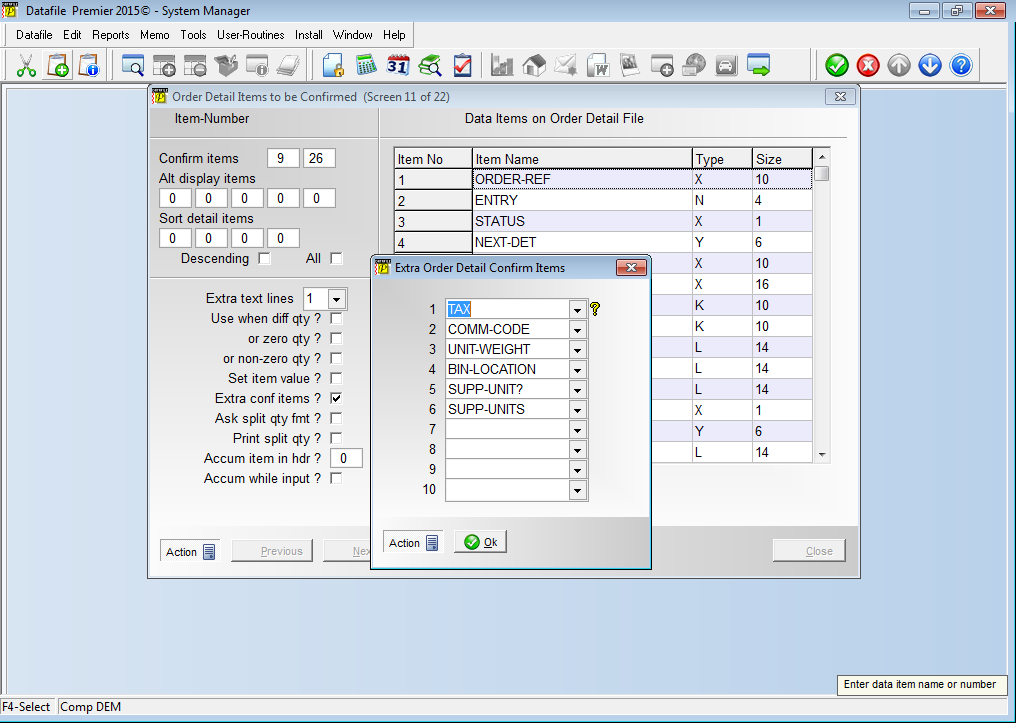 The existing two confirm items are displayed at the top of the screen. Further down is the new prompt Extra Conf Items – when set a pop-up form allows for the selection of a further ten items.
|
Attachments

There are no attachments for this article.
|
Related Articles 
Sales and Purchase Order Change Logging
Viewed 6994 times since Tue, Mar 3, 2020
Alternate Stock Selling Units (SOP Only)
Viewed 2744 times since Thu, Mar 24, 2016
Increased Details per Order
Viewed 2227 times since Thu, Feb 25, 2016
Order Entry - Prevent Changes to Price/Discount (SOP Only)
Viewed 575 times since Thu, Jan 2, 2025
Use Stock Prices from ‘Master’ Stock Item
Viewed 2952 times since Fri, Jul 15, 2016
Save Purchase Order Cost during Document Processing (POP Only)
Viewed 2336 times since Wed, Sep 21, 2016
Replicate Order Confirm Detail Replicate
Viewed 2036 times since Fri, Jul 15, 2016
Document Control Databases
Viewed 2290 times since Tue, Mar 3, 2020
Contract Invoicing - Two, Three and Four Yearly Invoicing
Viewed 2291 times since Wed, Sep 21, 2016
Sales / Purchase Order Processing - Quick Form Order Generation - Additional Features for Change Order Status
Viewed 2387 times since Fri, Jul 21, 2017
|
| Datafile Home | KB Home | Advanced Search |
|
 |
|
|
|
|
|
|
 Print Article
 Email Article to Friend