| Home » Categories » Multiple Categories |
Connection to SQL Server via ODBC and SQL Log Housekeeping |
|
Article Number: 2205 | Rating: 5/5 from 1 votes | Last Updated: Mon, Jun 12, 2023 at 2:42 PM
|
SQL ReplicatorConnection to SQL Server via ODBC
The Datafile SQL Replicator connects directly to a MySQL or MsSQL Server. Where the server is on a remote connection you may want to use SSL. The existing connection options don’t allow this but you can now connect via ODBC – with ODBC set to use SSL.
To enable connection via ODBC you need to setup your ODBC connection to the SQL Server and apply your required security settings. Once in place you then need to enable the Datafile SQL Replicator to use the ODBC connection.
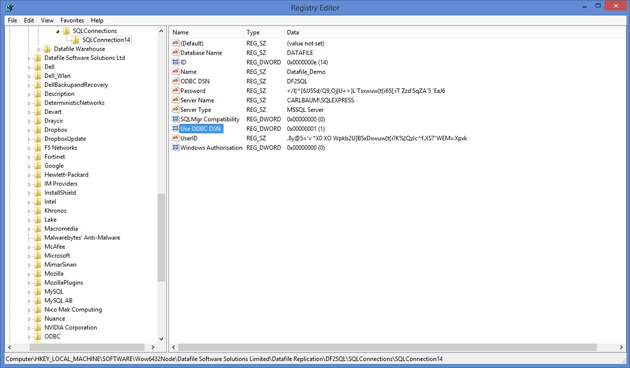
To this you need to manually enable two Registry settings. The relevant entries to enable ODBC are in the registry key
HKLM\SOFTWARE\WOW6432NODE\Datafile Software Solutions Limited
within here you’ll have nodes for Datafile Replication\DF2SQL\SQLConnections\SQLConnectionnn
ODBC DSN – modify to include the name of your System DSN connection. Use ODBC DSN – modify to set to ‘1’ to use the ODBC DSN connection.
Note
If you are adding ODBC connectivity to an existing SQL Connection you may find that the two ODBC registry values are not in place. Open the SQL Monitor and then close – this will automatically add the new registry keys.
SQL Log Housekeeping
As part of replicating the Datafile tables to MsSQL or MySQL the system maintains an activity log within a table DF2SQLLog. This log file expands over time and may need to be periodically cleared down to keep the SQL Database size down. This new feature allows the SQL Replicator to perform this housekeeping – retaining a set number of days.
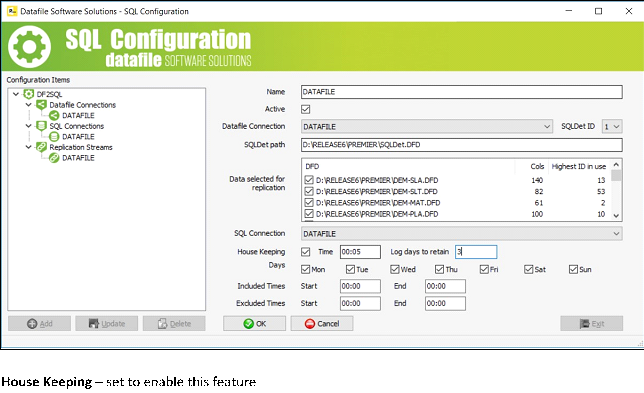
As part of the SQL Configuration for the Replication Stream a new option allows you to set the retention period.
Time – set the time to perform the cleardown of the DF2SQLLog table – the time set should not be within the ‘excluded times’ for processing.
Log Days to Retain– set the number of days to retain when cleardown the log table.
Note
Once set, to enable the Replicator to clear down you will need to stop and restart the service.
|
Attachments

There are no attachments for this article.
|
Related Articles 
Document Design Manager - E-Mail Settings
Viewed 2846 times since Wed, Jun 13, 2012
Pick Lists – All Records Button
Viewed 2701 times since Wed, Jun 13, 2012
Validate Account and Stock Groups Entries
Viewed 2426 times since Fri, May 27, 2016
Salesperson Access Filter for Sales Accounts and Sales Orders
Viewed 3226 times since Fri, Oct 26, 2012
Landing Pages - Sorting and Grouping on Table Items
Viewed 480 times since Thu, Oct 17, 2024
Group Account Sales Enquiry
Viewed 10013 times since Fri, Oct 26, 2012
Screen / Spool Report Hyperlinks
Viewed 2542 times since Tue, Jun 12, 2012
Datafile Software - User ID Set Up
Viewed 8228 times since Wed, Jun 13, 2012
Ledger Enquiry - Alternate Link Item for History Databases
Viewed 847 times since Tue, Oct 15, 2024
Landing Pages - Include Filtered Records in Count
Viewed 402 times since Tue, Oct 15, 2024
|
| Datafile Home | KB Home | Advanced Search |
|
 |
|
|
|
|
|
|
 Print Article
 Email Article to Friend