| Home » Categories » Multiple Categories |
Additional Order Accumulation Items |
|
Article Number: 2247 | Rating: Unrated | Last Updated: Mon, Jun 19, 2023 at 4:43 PM
|
|
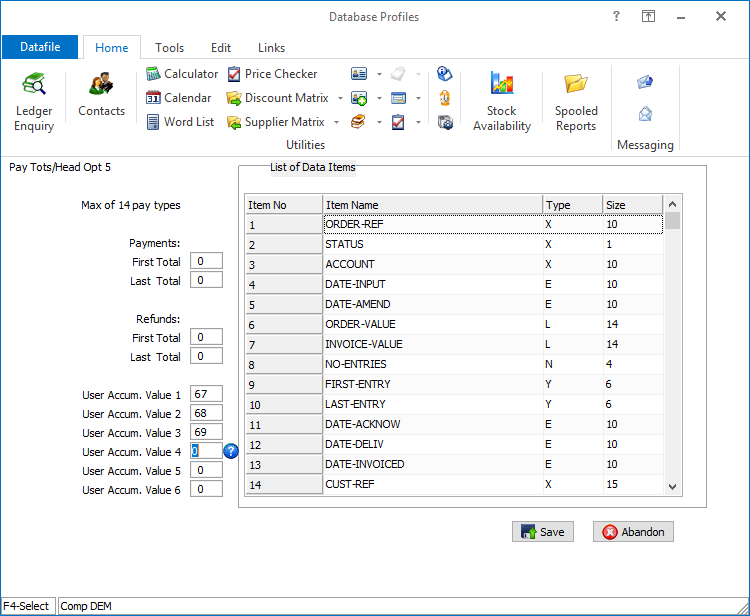
Datafile 2019 and above, Diamond and Premier Only Existing options allow for the accumulation of three items from the sales/purchase order detail to the order header. These items are used to accumulate values such as order quantity, order weight and so on. This new feature doubles the number of accumulation items from three to six.
Installation
Set Database Profiles
Each accumulation item requires a matching reference between the order header and the order detail files. These items are referenced via the Database Profiles.
For Sales Order Processing the order header accumulations items are reference on the Payment Totals / Header Optional 5 parameter screen with the order detail items to be accumulated referenced on Detail Optional 6. For Purchase Order Processing the order header items are referenced on Header Optional 3 and Detail Optional 6.
|
Attachments

There are no attachments for this article.
|
Related Articles 
Document Control Databases
Viewed 2252 times since Tue, Mar 3, 2020
Reset Job Outstanding Values (POP only)
Viewed 2181 times since Wed, Jul 4, 2012
Pre-Select Batches for Warehouse
Viewed 465 times since Tue, Oct 15, 2024
Global Change Account Code on Sales / Purchase Orders
Viewed 2414 times since Tue, Jun 12, 2012
Select Key Definition
Viewed 2305 times since Wed, Jul 4, 2012
Purchase Order Document Processing
Viewed 2011 times since Tue, Jul 3, 2012
Schedule Call-Off
Viewed 2009 times since Tue, Jul 3, 2012
Order Processing and Other Files
Viewed 1909 times since Tue, Jul 3, 2012
Additional Detail Entry Options
Viewed 2337 times since Tue, Jul 3, 2012
Job Costing Link at Delivery Notes and Invoices
Viewed 2058 times since Tue, Jul 3, 2012
|
| Datafile Home | KB Home | Advanced Search |
|
 |
|
|
|
|
|
|
 Print Article
 Email Article to Friend