| Home » Categories » Multiple Categories |
Connection to SQL Server via ODBC and SQL Log Housekeeping |
|
Article Number: 2205 | Rating: 5/5 from 1 votes | Last Updated: Mon, Jun 12, 2023 at 2:42 PM
|
SQL ReplicatorConnection to SQL Server via ODBC
The Datafile SQL Replicator connects directly to a MySQL or MsSQL Server. Where the server is on a remote connection you may want to use SSL. The existing connection options don’t allow this but you can now connect via ODBC – with ODBC set to use SSL.
To enable connection via ODBC you need to setup your ODBC connection to the SQL Server and apply your required security settings. Once in place you then need to enable the Datafile SQL Replicator to use the ODBC connection.
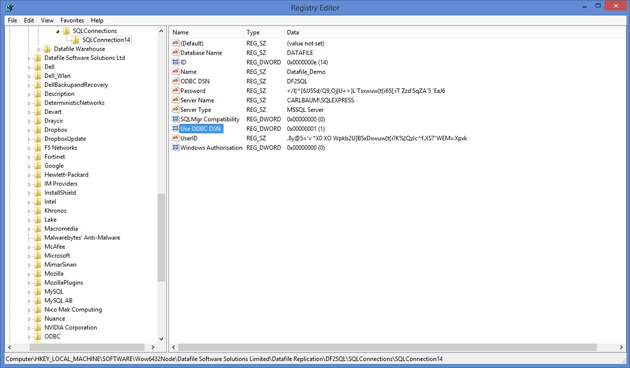
To this you need to manually enable two Registry settings. The relevant entries to enable ODBC are in the registry key
HKLM\SOFTWARE\WOW6432NODE\Datafile Software Solutions Limited
within here you’ll have nodes for Datafile Replication\DF2SQL\SQLConnections\SQLConnectionnn
ODBC DSN – modify to include the name of your System DSN connection. Use ODBC DSN – modify to set to ‘1’ to use the ODBC DSN connection.
Note
If you are adding ODBC connectivity to an existing SQL Connection you may find that the two ODBC registry values are not in place. Open the SQL Monitor and then close – this will automatically add the new registry keys.
SQL Log Housekeeping
As part of replicating the Datafile tables to MsSQL or MySQL the system maintains an activity log within a table DF2SQLLog. This log file expands over time and may need to be periodically cleared down to keep the SQL Database size down. This new feature allows the SQL Replicator to perform this housekeeping – retaining a set number of days.
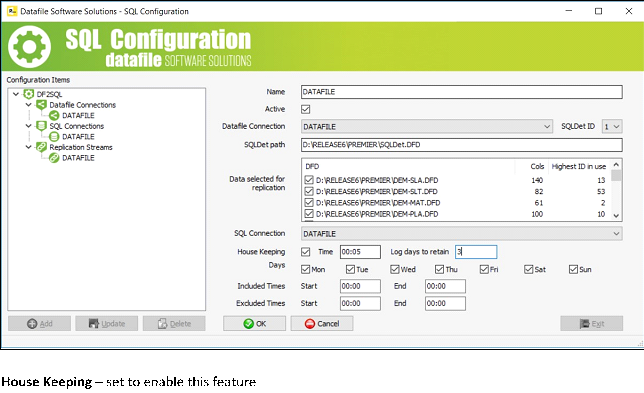
As part of the SQL Configuration for the Replication Stream a new option allows you to set the retention period.
Time – set the time to perform the cleardown of the DF2SQLLog table – the time set should not be within the ‘excluded times’ for processing.
Log Days to Retain– set the number of days to retain when cleardown the log table.
Note
Once set, to enable the Replicator to clear down you will need to stop and restart the service.
|
Attachments

There are no attachments for this article.
|
Related Articles 
Ledger Enquiry / Display Notes by Department
Viewed 3242 times since Mon, Jun 11, 2012
General System Options - Hide Post/Collect Messages Options
Viewed 922 times since Thu, Oct 17, 2024
Landing Pages - Sorting and Grouping on Table Items
Viewed 661 times since Thu, Oct 17, 2024
Extra 160 Items per Database
Viewed 2978 times since Wed, Jun 13, 2012
Ledger Enquiry – Improved Scans Option
Viewed 1635 times since Wed, Jun 13, 2012
Document Design Manager - Page Set-up
Viewed 5696 times since Wed, Jun 13, 2012
Landing Pages – Data Item Aliases
Viewed 247 times since Wed, Oct 23, 2024
Sub-Items Break on Character
Viewed 3079 times since Wed, Jun 13, 2012
Selection Criteria Range ‘Value’ Input
Viewed 3260 times since Fri, May 27, 2016
Warehouse Tablet - Show Stock Image on Enquiry
Viewed 910 times since Wed, Oct 23, 2024
|
| Datafile Home | KB Home | Advanced Search |
|
 |
|
|
|
|
|
|
 Print Article
 Email Article to Friend