| Home » Categories » Solutions by Business Process » Bill of Materials |
Order Entry - Allow Details Option when Updating Order Header |
|
Article Number: 2386 | Rating: Unrated | Last Updated: Thu, Oct 24, 2024 at 2:02 PM
|
|
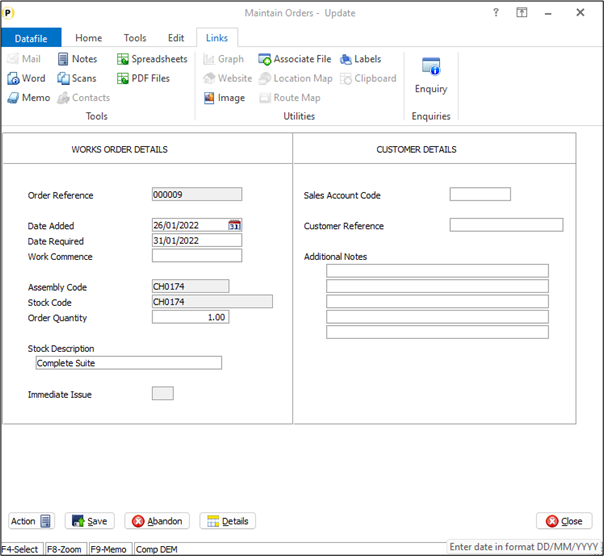
When adding a works order the system will automatically take you to the order detail entry screen after completing the order header. When updating, or viewing, the order header though you had to exit to update/view the details. A new option has been added with this release to allow you to access the order details when updating the order header.
When enabled a DETAILS button is available on the action options at the bottom of the screen.Note that when select the system will save any changes to the order header including processing any copy items.CLOSE on the details screen will exit from the order. InstallationApplication User Facilities To enable the option for accessing the order details a new parameter has been added to the Bill of Materials Optional Features. Premier Installer users can update the parameters by right-clicking on the Works Order Entry option on the menu and choosing Configure Option before selecting Optional Features / Instant Print / Fast Input. Alternatively, users can select Installation from the main menu followed by Application Manager and Application User Facilities. Select the Bill of Materials application and then Enter/Amend Orders, and Optional Features. The options to enable details access are on screen 1 of the Optional Features. 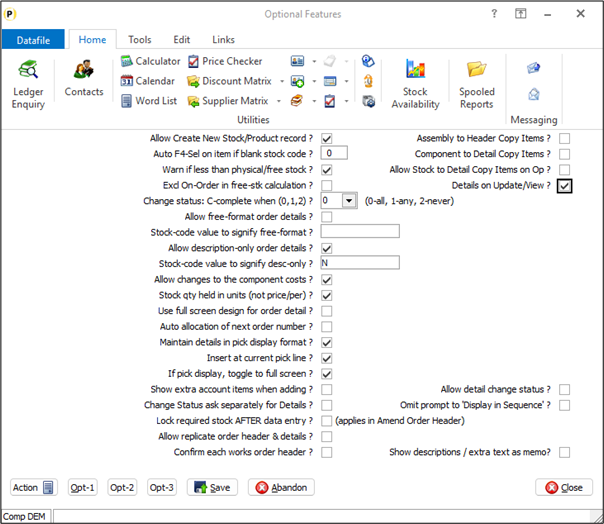
Details on Update/View – set to allow DETAILS button when updating/viewing the order header.
|
Attachments

There are no attachments for this article.
|
Related Articles 
Document Processing - Chain to Profiler Action
Viewed 150 times since Tue, Mar 24, 2026
Document Processing - Use System Wide References
Viewed 244 times since Tue, Mar 24, 2026
Change Order Status – Omit Option to Display in Sequence Entered
Viewed 202 times since Tue, Oct 15, 2024
Change Status - Confirmation Items
Viewed 169 times since Thu, Mar 19, 2026
Continuation Pages in Works Order Documents
Viewed 443 times since Tue, Oct 15, 2024
Bill of Materials - Copy Back to Sales Order Lines -Issue Components Only - Detail Pick Lists
Viewed 2077 times since Fri, Jul 21, 2017
Document Processing - Default / Save Action Quantity
Viewed 231 times since Thu, Mar 19, 2026
Works Order Operations – Stock Copy Items
Viewed 216 times since Wed, Oct 23, 2024
Automatic Documents - Abandon if Insufficient Component Stock
Viewed 234 times since Thu, Mar 19, 2026
Ledger Enquiry - Stock Control – Allow Fourth History Database
Viewed 277 times since Thu, Oct 24, 2024
|
| Datafile Home | KB Home | Advanced Search |
|
 |
|
|
|
|
|
|
 Print Article
 Email Article to Friend