| Home » Categories » Multiple Categories |
Fuel Scale Charge Posting |
|
Article Number: 2213 | Rating: Unrated | Last Updated: Mon, Jun 12, 2023 at 2:37 PM
|
|
Fuel Scale Charge Posting If your company is registered for VAT, you can reclaim the VAT element of any expenditure on fuel provided by your company for use with company cars. This usage includes both private and business mileage. In return, HM Revenue & Customs (HMRC) require a charge to be paid. This charge is calculated for each vehicle from the scale charge tables in HMRC Public Notice 700/64 Motoring Expenses. You can work out the charge using the HMRC website https://www.gov.uk/fuel-scale-charge When you've calculated the scale charges for each company car, these should be posted within the Cashbook Receipts option:
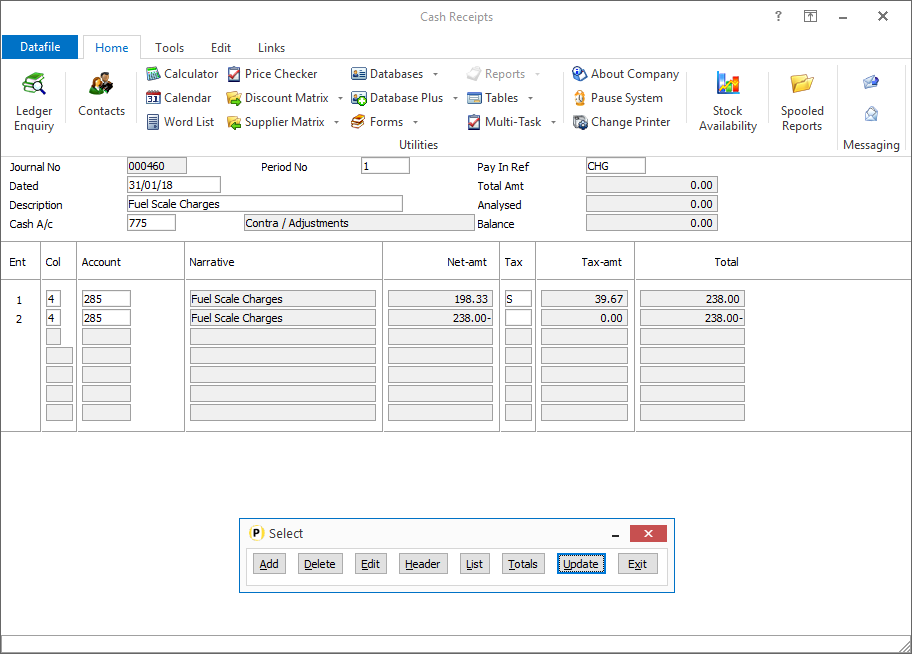 As per screenshot above, enter a Contra/Adjustments account in the Cash A/C box and a zero value in the Total Amt.
On line 1 of your posting choose the Fuel Scale Charges Expense account and post the fuel scale charge amount followed by the standard rate VAT letter - i.e. 238.00S. Pressing <Enter> will calculate the net and tax amounts from this. On line 2 of your posting select again the Fuel Scale Charge expense account and then in the amount field enter the amount as per the charge, including VAT, on the first line but with a negative value. Leave tax code blank or select a ‘Out of Scope’ VAT code.
|
Attachments

There are no attachments for this article.
|
Related Articles 
Account and Transaction Pick Lists
Viewed 2945 times since Mon, Jun 11, 2012
Account Statements - Application User Facilities
Viewed 2642 times since Mon, Jul 2, 2012
Update from Other Systems - Nominal
Viewed 2146 times since Thu, Jun 28, 2012
Account Audit Trail, Account Audit Trail (Currency) - Nominal
Viewed 2031 times since Wed, Jun 27, 2012
Change Order Status - Stock Record Locking
Viewed 535 times since Thu, Jan 2, 2025
Enter Invoiced & Paid
Viewed 2485 times since Mon, Jul 2, 2012
Transfer Listing - Cashbook
Viewed 2168 times since Wed, Jun 27, 2012
Aged Analysis of Debtors / Creditors
Viewed 4074 times since Mon, Jul 2, 2012
Multiple Updating - Update From Another Nominal - Nominal
Viewed 2334 times since Thu, Jun 28, 2012
Maintain Customer (Supplier) Accounts - Application User Facilities
Viewed 3324 times since Mon, Jul 2, 2012
|
| Datafile Home | KB Home | Advanced Search |
|
 |
|
|
|
|
|
|
 Print Article
 Email Article to Friend