| Home » Categories » Multiple Categories |
VAT Adjustments - Post-Dated Purchase Invoices |
|
Article Number: 2212 | Rating: Unrated | Last Updated: Mon, Jun 12, 2023 at 2:19 PM
|
|
Post-Dated Purchase Invoices The Datafile Purchase Ledger allows posting to the current purchase ledger period and one future period. If you receive a purchase invoice for an earlier period that has now been closed, you can post that transaction but for Nominal and VAT purposes it’s treated as a current period transaction.
Adjustments are therefore required if the transaction needs to be posted into the original correct period for the VAT Form 100.
Option 1 – Where Real-Time Updating to the Nominal Ledger is Set
If the system is configured for real-time updating, then each purchase transaction will generate its own nominal journal. Within the Nominal Ledger – Other Journal Options, the Change Journal Period option should be used as per screenshot below:
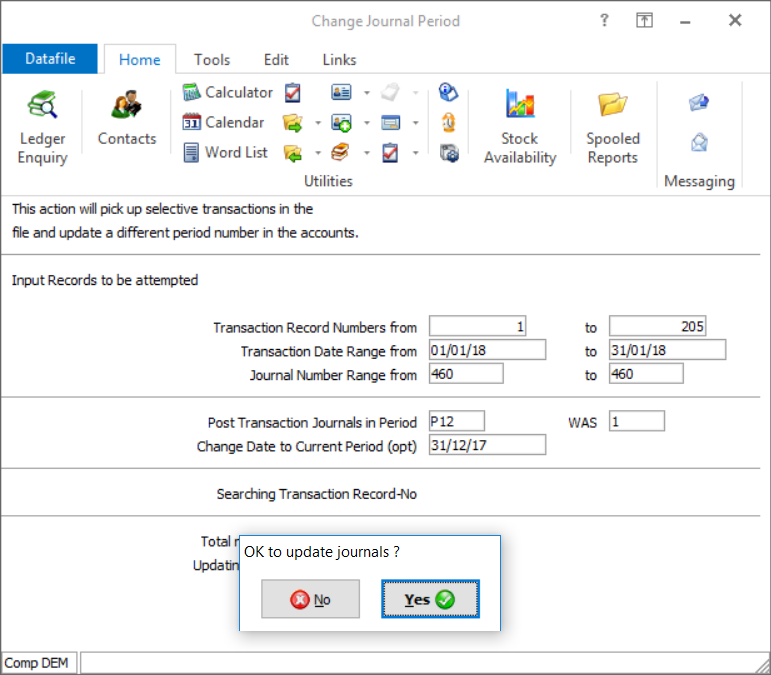 The Change Journal Period option allows you to enter a date and journal number range and then asks you to confirm the period to adjust to and the period to adjust out.
Option 2 – Where Nominal Ledger Batch Updates Are Used If batch updating to the Nominal Ledger, then it’s likely the posting will include additional transactions that should not have the period adjusted. For these, manual adjustments should be made using the Cashbook Payment processing options. The adjustment is done in two stages 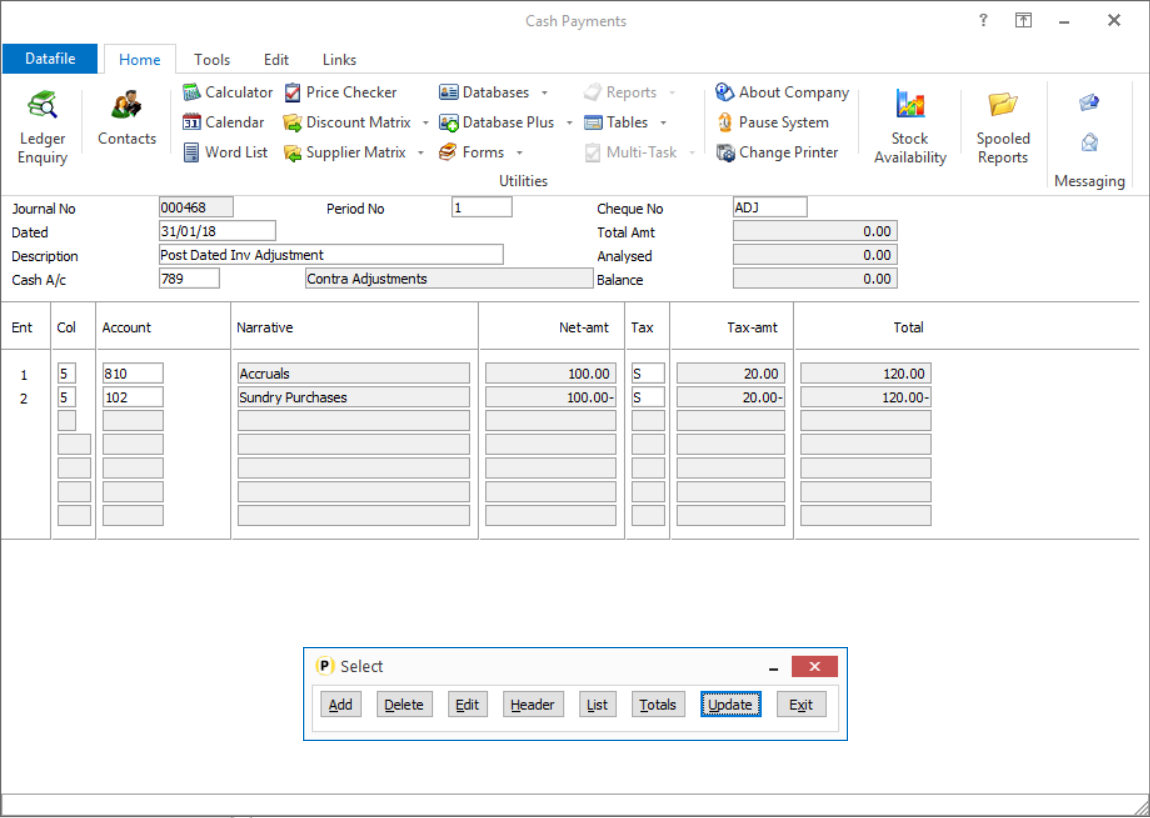 Select your Contra Adjustments account as the Bank Account for the payment, and enter a zero value. On line 1 select your balance sheet Accruals account and post the goods / vat amount. On line 2 select the original nominal expense account and post identical values but with a negative goods / vat amount.
After reversing the posting you then need to re-enter to the required period – reversing the above so that the positive values post to your expense account and the negative values post to the accrual account. |
Attachments

There are no attachments for this article.
|
Related Articles 
Automatic Payments – Set Transaction Description from Account
Viewed 456 times since Wed, Oct 16, 2024
Utilities
Viewed 2754 times since Mon, Jul 2, 2012
Account Maintenance Improvements
Viewed 2029 times since Fri, Jun 8, 2012
Automatic Bank Reconciliation - Display Totals When Tag Multiple Entries
Viewed 761 times since Thu, Jan 2, 2025
Standard Update – Sales and Purchase Ledgers - Nominal
Viewed 1618 times since Thu, Jun 28, 2012
Financial Summaries – Account Selection Display
Viewed 1294 times since Wed, Jun 13, 2012
Transaction Control Numbers - Cashbook
Viewed 2131 times since Thu, Jun 28, 2012
Set Application Code Formats - Nominal
Viewed 2154 times since Wed, Jun 27, 2012
Enter Credit Notes
Viewed 2960 times since Mon, Jul 2, 2012
Windows 10 1803 Update / Windows Defender
Viewed 4408 times since Wed, May 30, 2018
|
| Datafile Home | KB Home | Advanced Search |
|
 |
|
|
|
|
|
|
 Print Article
 Email Article to Friend